by http://webgeektutorials.blogspot.com

Friday, December 30, 2016

Magical Tool for MAC Lovers : TinkerTool

TinkerTool is an application that gives you access to additional preference settings Apple has built into macOS. This allows to activate hidden features in the operating system and in some of the applications delivered with the system.


The tool makes sure that preference changes can only affect the current user. You don't need administrative privileges to use the tool. With this design, it is no problem to use TinkerTool in professional networks where users have restricted permissions. The program will never change any component of the operating system, so the integrity of your system is not put at risk, and there will be no negative effect on system updates. Compliance with these security rules is additionally guaranteed by the application sandbox of macOS.

All preference settings changed by TinkerTool can be reset to Apple's defaults, or to the state that existed before using the tool. No dangerous background processes are used for TinkerTool's operation.
TinkerTool is electronically distributed software. You can download the product free of charge.

Download link

Thursday, April 16, 2015

How to enable code hinting or auto completion in notepad++

Notepad++ is my favorite open source tool for web development, day by day its improving and becoming better and better. It's been 6 years and i'm enjoying this tool.

In my opinion notepad++ is a must have tool for every programmer using windows.Notepad++ offers lots of handy features for the faster programming. One such feature is auto-completion of code, by default the auto completion is disabled. To enable Auto completion of code here we go:

Step 1 : Go to Settings and select preferences.


Step 2 : Select "Auto-comptetion" from left side preference list.

Step 3 : select “Enable auto-completion on each input”  & “function and word completion", and also enable  "Function parameters hint on input".

That's all, close preference dialog and you are now ready to go. Happy coding...


Wednesday, April 15, 2015

Notepad++ and CakePHP .ctp Syntax Hightlighting


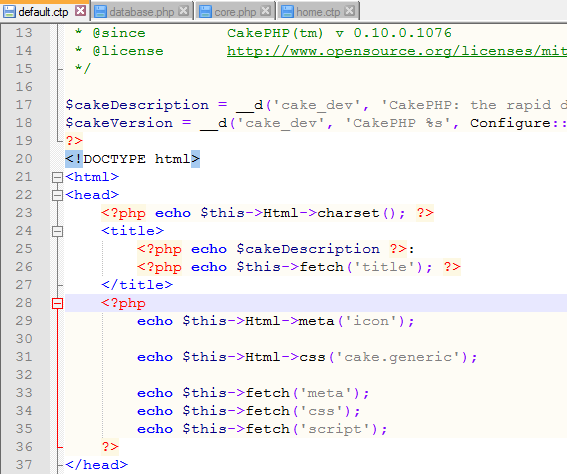
Generally CakePHP file syntaxes are not recognized and highlighted by Notepad++. In reality Notepad++ is not able to identify the files of CakePhp which uses the syntax as PHP.
 
How to Enable Syntax Highlight for CakePHP :

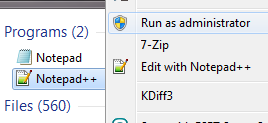
Step 1 : Open notepad++ with Admin Right .


Step 2 : Goto ‘Settings’ Menu and choose ‘Style Configurator’.


Step 3 : Select ‘PHP’ as Language and add ‘ctp’ without quotes. For more i’m adding ‘thtml’ and ‘mod’ extension also.


Step 4 : press “save and close” and exit from settings. Close the editor and re-open again and here you go.

Note : if you are not seeing any syntax highlighting it means you have not closed existing .ctp files. So close .ctp file from notepad++ and open it again.

Friday, September 5, 2014

Sencha Touch 2 - View and Controller Basics


Javascript: Introduction to Anonymous functions


Anonymous functions are functions that are dynamically declared at runtime that don’t have to be given a name.

Anonymous functions are declared using the function operator. You can use the function operator to create a new function wherever it’s valid to put an expression. For example you could declare a new function as a parameter to a function call or to assign a property of another object.

Example of a non-anonymous function:
function dosomething(){

    var b = 3;
    a += b;
    return a;
}

Monday, April 8, 2013

Introducing GOOGLE NOSE BETA

What is that GOOGLE NOSE? 

Google NoseBETA leverages new and existing technologies to offers Android Ambient Odor Detection technology, collects smells via the world's most sensible mobile operating system.
SMELLCD™ 1.8+ high-resolution compatible for precise and controlled odors.

Official Video :


Source  : google

In its latest April Fool 2013 prank, Google claims the ability to search for smells! According to Google, the Nose BETA leverages new and existing technologies to offer the sharpest olfactory experience available. According to Google, the search engine now has a data base of 15 million smells!  

Wasn't that a good prank? :)

Tuesday, July 10, 2012

Reload / Refresh Page in jQuery

Here is the code to refresh the page when u click on a button component. Its just like you press "F5" button to refresh page.
=======================Code begins =========================
<!doctype html>
<html lang="en-us">
<head>
<title>Reload/Refresh a Page in jQuery</title>
<script type="text/javascript" src="http://code.jquery.com/jquery-1.7.2.js"> </script>

<script type="text/javascript">
$(document).ready(function() {
$('#Refresh').click(function() {
$("p").append("<strong>Now Refreshing page..</strong>");
location.reload();
});
});
</script>

Thursday, June 28, 2012

Oracle DBA script: Monitor user activity on the DB

Code :


set linesize 80
set verify off message off echo off pause off timing off time off
set feedback off
column o format a8 heading 'O/S|User'
column u format a10 heading 'Oracle|Userid'
column s format a12 heading 'R-S|Name'
column txt format a45 heading 'Current Statement' word

Oracle DBA script: Display hit ratio on Dictionary Cache

Increase Shared pool size to reach a 90% hit ratio on Dictionary Cache. Entries for dc_table_grants, d_user_grants, and dc_users should be under 5% each in the MISS RATE % column

Code: 
select
parameter,gets,Getmisses ,
getmisses/(gets+getmisses)*100 "miss ratio",
(1-(sum(getmisses)/ (sum(gets)+sum(getmisses))))*100 "Hit ratio"
from v$rowcache
where gets+getmisses <>0
group by parameter, gets, getmisses ;

Oracle DBA script: tablespace usage in %, blocks used etc

Code :
SELECT RPAD(t.name,18,' ') tablespace ,
LPAD(TO_CHAR(CEIL( (SUM(s.blocks)*COUNT(*)) / (SUM(f.blocks) *
POWER(COUNT(DISTINCT(f.file#)),2)) * 100 )),3) Pct ,
LPAD(TO_CHAR(TRUNC(SUM(f.blocks) * t.blocksize *
COUNT(DISTINCT(f.file#)) /
( COUNT(*) * 1024 * 1024 * 1024 ),2)),6) vol_G ,
LPAD(TO_CHAR(SUM(f.blocks) * t.blocksize * COUNT(DISTINCT(f.file#)) /
( COUNT(*) * 1024 * 1024 )),8) volume_M ,
TRUNC(SUM(s.blocks) * t.blocksize /
( 1024 * 1024 * COUNT(DISTINCT(f.file#))),2) taken_M ,
TRUNC( ( SUM(f.blocks) * t.blocksize * COUNT(DISTINCT(f.file#))
/ ( COUNT(*) * 1024 * 1024 ) )
- ( NVL(suM(s.blocks),0) * t.blocksize
/ ( 1024 * 1024 * COUNT(DISTINCT(f.file#)) ) ),2) remain_M
FROM sys.seg$ s, sys.ts$ t, sys.file$ f
WHERE s.ts# (+) = t.ts#
AND f.ts# = t.ts#
AND f.status$ = 2
GROUP BY t.name, t.blocksize
ORDER BY 1;

Oracle DBA script: Display Quota Allocated

Code:

select * from DBA_TS_QUOTAS
order by Tablespace_Name, Username;

Oracle DBA script: List the UGA and PGA used by each session

column name format a25
column total format 999 heading 'Cnt'
column bytes format 9999,999,999 heading 'Total Bytes'
column avg format 99,999,999 heading 'Avg Bytes'
column min format 99,999,999 heading 'Min Bytes'
column max format 9999,999,999 heading 'Max Bytes'
ttitle 'PGA = dedicated server processes - UGA = Client machine process'


compute sum of minmem on report
compute sum of maxmem on report
break on report

select se.sid,n.name, 
max(se.value) maxmem
from v$sesstat se,
v$statname n
where n.statistic# = se.statistic#
and n.name in ('session pga memory','session pga memory max',
'session uga memory','session uga memory max')
group by n.name,se.sid
order by 3
/

Oracle DBA Script : Monitor and veryfy deadlocks

Monitor and Verify DEAD Locks: Holding and Waiting Sessions

Code: 

set lines 80 echo on ver off timing on term on pages 60 feed on head on
spool DEAD_LOCK_WAITERS.LST

col " " for A25
col "Holding Session Info" for A25
col "Waiting Session Info" for A25

Thursday, June 21, 2012

Check DirectX version with DirectX Diagnostic Tools in Windows

How to detect DirectX version installed in Windows.

Microsoft DirectX is a group of technologies designed to make Windows-based PCs an ideal platform for running and displaying applications rich in multimedia elements such as full- color graphics, 3D animation, video and rich audio.

DirectX includes security and performance updates, along with many new features across all technologies, which can be accessed by applications using the DirectX APIs.

Friday, June 15, 2012

Oracle DBA Script : Keep tablespace usage less than 80%

Keep tablespace usage < 80% Keep contiguous free space

Code:
prompt ** Tablespace Space Usage **
prompt
prompt Goal: Keep tablespace usage < 80%
prompt . Keep contiguous free space
prompt
prompt Corrective Action: Add more space to prompt tablespaces
prompt Coalesce fragmented free space.
prompt
compute sum LABEL 'TOTAL' of SUM_B1 on report
compute sum LABEL 'TOTAL' of SUM_B2 on report
compute sum LABEL 'TOTAL' of b3 on report
BREAK ON REPORT
Column TS1 Format A25 Heading 'TS Name'
Column SUM_B1 Format 999,999,999,999 Heading 'Total Space|Allocated'
Column SUM_B2 Format 999,999,999,999 Heading 'Total Free|Space'
Column b3 Format 999,999,999,999 Heading 'Total Space|Used'
Column b4 Format 90.99 Heading 'Percent|Used'
Column b5 Format 990.99 Heading 'Percent|Free'
Column b6 Format 99,999,999,999 Heading 'Max Single|Free Space'
Column b7 Format 999,999 Heading 'Count|Free|Space'

Oracle Find Top 20 Longest Running Process in UNIX

Find the top 20 longest running processes in unix. Useful for high CPU bound systems with large number of users. Script also identifies processes without a oracle session.

Shell Script:
#!/bin/ksh
#
# Find Highest CPU used Oracle processes and get the Username
# and SID from oracle
# Only 3 character SIDNAME is displayed - Adjust the script according to your need.
#
date
echo " Top 20 CPU Utilized Session from `hostname`"
echo " ============================================"
echo "O/S Oracle Session Session Serial UNIX Login Ora CPU Time"
echo "ID User ID Status ID No ID MMDD:HHMISS SID Used"
echo "-------- ----------- -------- ------- ------- ------- ----------- --- --------"
ps -ef|grep LOCAL|cut -c1-15,42-79|sort -rn +2 | head -20 | while read LINE
do
SIDNAME=`echo $LINE | awk '{ print $4 }' | cut -c7-14`
CPUTIME=`echo $LINE | awk '{ print $3 }'`
UNIXPID=`echo $LINE | awk '{ print $2 }'`
#echo $SIDNAME $CPUTIME $UNIXPID
export ORACLE_SID=$SIDNAME
SIDNAME=`echo $ORACLE_SID | cut -c4-6`
export ORACLE_HOME=`/dba_script/bin/find_ohome.sh ${ORACLE_SID}`
export SHLIB_PATH=$ORACLE_HOME/lib:/usr/lib
export TMPDIR=/tmp

Oracle DBA Script : Free Space left in the tablespaces

col tablespace_name format a20 heading 'Tablespace'
col allocated format 99,999,999,999 heading 'Allocated'
col used format 99,999,999,999 heading 'Used'
col unused format 99,999,999,999 heading 'Unused'
col pct_used format 99.99 heading 'PCT Used'
spool tbsp_free.lst

select rtrim(a.tblsp) tablespace,
sum(to_use) allocated,
sum(to_use - nvl(free,0)) used,
sum(nvl(free,0)) unused,
sum(((to_use-(to_use - nvl(free,0)))*100)/to_use) pct_used
from tspace_alc a,
tspace_free b
where a.tblsp = b.tblsp (+)
group by a.tblsp;

Oracle DBA Script : This PL/SQL script reports the %space left on each tablespace

DECLARE
CURSOR cur_ts IS
SELECT tablespace_name,
SUM(bytes) bytes
FROM dba_data_files
GROUP BY tablespace_name;

CURSOR cur_ts_fs(p_ts VARCHAR2) IS
SELECT SUM(BYTES) fs,
MAX(bytes) mx
FROM dba_free_space
WHERE tablespace_name = p_ts;

lv_fs NUMBER := 0;
percent_fs NUMBER := 0;
large_fs NUMBER := 0;
lv_name V$database.name%TYPE;

BEGIN
DBMS_OUTPUT.enable(1000000);
SELECT name into lv_name from v$database;

Monday, June 11, 2012

Oracle DBA Script : Calculate buffer cache hit ratio in DB

Calculate buffer cache hit ratio in the database. Make sure it is more than 80 for an oltp environment and 99 is the best value.

Code:
column "logical_reads" format 99,999,999,999
column "phys_reads" format 999,999,999
column "phy_writes" format 999,999,999
select a.value + b.value "logical_reads",
c.value "phys_reads",
round(100 * ((a.value+b.value)-c.value) /
(a.value+b.value))
"BUFFER HIT RATIO"
from v$sysstat a, v$sysstat b, v$sysstat c
where

DBA Script: Look for number of extents

Look for the number of chunks which are free,look for also the number of extents being used by objects..primarily for indexes

Code:
set pagesize 300
spool frag.rpt
Prompt Fragmentation Report for the tablespaces
start ./title132.sql "Tablespace Fragmentation report" "frag.sql"
column sumbytes format 999,999,999,9999
column extents forma 999999999
column bytes format 999,999,999,999
column largest format 999,999,999,999
column Tot_Size format 999,999,999,999
column Tot_Free format 999,999,999,999
column Pct_Free format 999
column Chunks_Free format 9999
column Max_Free format 9999999999
set echo off

PROMPT SPACE AVAILABLE IN TABLESPACES

select a.tablespace_name,sum(a.tots) Tot_Size,
sum(a.sumb) Tot_Free,
sum(a.sumb)*100/sum(a.tots) Pct_Free,
(sum(a.largest)/1024)/1024 Max_Free,sum(a.chunks) Chunks_Free
from
(
select tablespace_name,0 tots,sum(bytes) sumb,
max(bytes) largest,count(*) chunks
from dba_free_space a
group by tablespace_name
union
select tablespace_name,sum(bytes) tots,0,0,0 from
dba_data_files
group by tablespace_name) a
group by a.tablespace_name;

column owner format a15
column segment_name format a30