

Welcome to the GEEK world, best place where you find topic about latest cutting edge technology on website and mobile. Learn and grow your knowledge with the information and tutorials about Website designing, CSS tutorials, Java Script tutorials, Ruby tutorials, ROR tutorials, HTML tutorials, HTML5 , JQuery, Javascript tutorials, Photoshop tutorials, Flash, games tutorials, Cheat sheets, Design tools, Action Scripts as well as MySql, Oracle and many more in a easy way to use and understand.
Showing posts with label Photoshop. Show all posts
Showing posts with label Photoshop. Show all posts
Monday, April 16, 2012
Photoshop CS6 beta Ready to download
Adobe Photoshop "World's best digital image editing software" beta CS6 is available for download now. It has new look and some really effective and magical tools. Adobe Photoshop CS6 beta is capable of 3D image editing and quantitative image analysis capabilities but these features are available in shipping version of Photoshop CS6 extended. You'll find lots of new ways to work faster and with greater creative freedom and precision when you dive into Photoshop CS6 beta.
You can free download adobe Photoshop CS6 beta by following link given below
Link: http://labs.adobe.com
Here below 3 videos displays capabilities of new Photoshop CS6 beta.


Wednesday, March 14, 2012
Tintii Photo Filter 2.6.0 for Adobe Photoshop
Tintii photo filter – a smart photo filter for affecting colour select effects. Also known in the manner that colour popping, think of Schindler’s List’s small quantity girl in red, or the dramatic manner of Sin City. Available as the pair a standalone program, and as a Photoshop stopple-in.
Tintii 2.6.0 is now available for Windows, Mac OS X and Linux, introducing some recent interface innovations incorporated in Urban Lightscape, restoring plugin support for 32-bit Photoshop under Mac OS X, and fine-tuning the behaviour of lightness sliders. It also features a new application icon designed by the team at Creative Freedom.
Detailed changes are:
- New application icon.
- Centred image in preview pane and added textured background.
- Changed lightness sliders to apply multiplicative rather than additive adjustments.
- Added info bar for help messages.
- Separated file types in open and save dialogs.
- Fixed crashes in 32-bit Photoshop on Mac.
Saturday, December 31, 2011
Photoshop CS5 best features demo
Adobe Creative Suite (CS) is a collection of graphic design, video editing, and web development applications made by Adobe Systems. The collection consists of Adobe's applications (e.g., Photoshop, Acrobat, InDesign), that are based on various technologies (e.g., PostScript, PDF, Flash). The latest version, Adobe Creative Suite 5.5 (CS5.5), was released on April 12, 2011.
Creative Suite 5 and I thought I would share with you Top 5 Favorite Features in Photoshop CS5. There are certainly many more new features than you'll see here, but these are definitely among my favorites.
Creative Suite 5 and I thought I would share with you Top 5 Favorite Features in Photoshop CS5. There are certainly many more new features than you'll see here, but these are definitely among my favorites.
Photoshop Convert photo to sketch/line draw
This tutorial is just the first video of a multi video session that will show how to turn a photo into a drawing and adding a lil jazz to the image.
Sunday, March 13, 2011
Create abstract background
A quick and simple way of making a background and then how it can be customised. Thanks to Gavin Hoey for this great share.
Create a Colorful Aurura Effect
This tutorial on creating a streaky colored Aurura effect with a wispy smokey effect smudged on top as well. Learn about the techniques used to create those glowing vibrant color effects that you see so often in web design these days! Thank you tutvid for you contribution..
Photoshop : Professional Black & White
A very quick tutorial how to make your color photo to professional black & white photos, thanks to video maker, just in 60 second so don't expect more, you can do more at your end to enhance it. :)
Photoshop : Digital weight loss
Photoshop CS5 tutorial explainig how to virtually make someone fit using the liquify filter. This is very quick tutorial, Thanks a ton to uploader.
Adding color to makeup
Photoshop CS5 that enables photographers to open and manipulate images in non-destructive and now even more efficient ways. This covers the benefits of the raw processing, which makes it possible to more precisely control an image's appearance—exposure, shadow and highlight detail, color balance, sharpness, and more—including new workflow procedures and technical concepts and issues. Learn the entire Camera Raw workflow, from opening and resizing, toning and cropping, to sharpening and saving.
Thanks to Camera Raw 6 who provided this easy tutorials.
Thanks to Camera Raw 6 who provided this easy tutorials.
Digital makeup in photoshop
This demonstrates the digital makeup using blending options and various tools, you will be learning how to add make up, digitally. Tutorial is quite handy and informative.
Monday, February 14, 2011
Photoshop CS5 Changing Hair Colour
Nice tutorial here on how to change the color of hair on a person in a photograph using Photoshop CS 5. What's really nice about this is that it also shows how to apply streaks of color to the person's hair. Have fun!
Thursday, February 10, 2011
Photoshop Glass Text Effect
How to create a glass text effect? Its a simple effect using the Blending Options.
This tutorials is divided into two parts. Big thanks goes to the up loader.
Part-1
This tutorials is divided into two parts. Big thanks goes to the up loader.
Part-1
How to Create Magical Effects
HD video to assist how one can create magical effects using Photoshop.
3D text in Photoshop CS5
How to create 3D effects within PhotoShop CS5. Though not as indepth as say a strictly 3D modeling program, this works fine for print and web purposes. The Process is fairly simple to learn, here are some good video resources.
With Photoshop CS5 Extended, you can create 3D logos and artwork from any text layer, selection, or layer mask with new Adobe Repoussé technology. Twist, rotate, extrude, bevel, and inflate these designs, and then easily apply rich materials like chrome, glass, and cork to explore different looks. And take your designs even further by leveraging the Adobe 3D Forge engine for advanced editing of your 3D models.
With Photoshop CS5 Extended, you can create 3D logos and artwork from any text layer, selection, or layer mask with new Adobe Repoussé technology. Twist, rotate, extrude, bevel, and inflate these designs, and then easily apply rich materials like chrome, glass, and cork to explore different looks. And take your designs even further by leveraging the Adobe 3D Forge engine for advanced editing of your 3D models.
Thursday, January 27, 2011
Photoshop Retouching video tutorial
Best part of Adobe Photoshop is, it is best go-to tool for digital artists when it comes to professionally retouching images. Enhancing and retouching photos in Photoshop is an effective way to "work with what you’ve got".
There are many tips, tricks, and tutorials for improving things like skin tone and imperfections, and enhancing the photo subject’s features. This article shares a huge variety of photo retouching tutorials for Photoshop users with brief descriptions of each.One example video, all credit goes to the up-loader.
This is the beauty of Photoshop. If you like this tutorial, thumps up and download from youtube.com
Thursday, December 30, 2010
Actions in Photoshop
Actions saves time and make you more productive during post-processing. Actions are basically the same thing as macros in Microsoft office. They can be used to speed up repetitive tasks, make quick work of time consuming edits, and give you a little creative inspiration.
For a photographer, web designer it could be saving files as lesser-quality jpegs or making a certain size thumbnail of a picture is frequent.
1. ACTIONS PALETTE
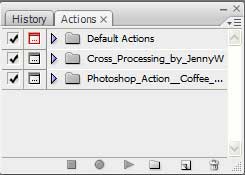
If your actions palette is nowhere to be found, you can activate it under the “Window” menu. Once you do this, you should see a palette similar to the one in this photo. If you don’t have any actions defined yet, you’ll probably just see the “Default Actions” set.
Subscribe to:
Posts (Atom)